
Systems & CloudExplainer
Conditional Access Without the Marketing Language
A practical explanation of how Microsoft Entra Conditional Access evaluates signals, applies policy, and makes access decisions—and where its protection stops.
Conditional Access is often described with phrases such as “Zero Trust policy engine.” That is accurate at a high level, but it can hide the useful part: what the system actually does when someone tries to sign in.
In plain terms, Conditional Access is a set of if-this-then-that access policies in Microsoft Entra ID. It receives an authentication attempt, considers the signals available for that attempt, finds the policies that apply, and enforces their controls. It operates after the initial authentication step; it does not replace identity proofing, passwords, or an identity provider.
Where it sits in an access request
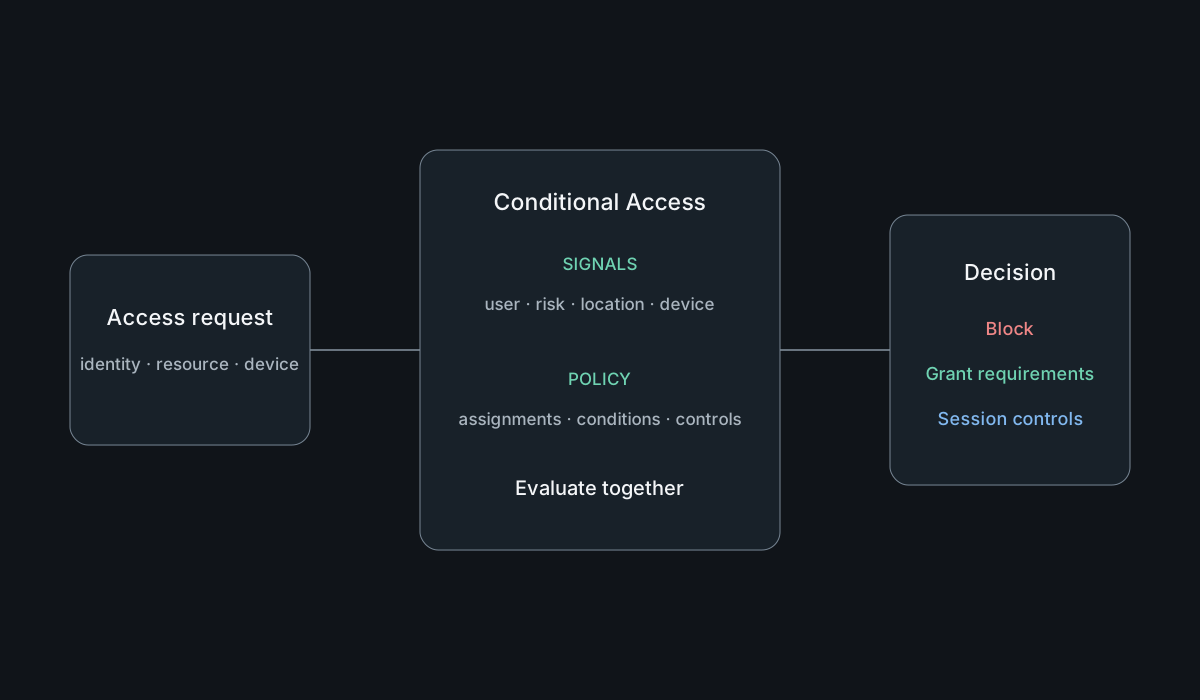
An access request begins with a person or workload presenting an identity to Entra ID. After the first authentication factor, Conditional Access can evaluate the request. The available signals can include the user or workload identity, the target resource, device platform, location information, client application, device state, and risk signals when the relevant services are available.
A policy combines three ideas:
- Assignments define who and what the policy applies to.
- Conditions narrow the circumstances in which it applies.
- Controls decide what must happen next.
The result may be a block, a grant after requirements are met, or session restrictions. A grant control can require multifactor authentication, an authentication strength, a compliant device, or another supported condition. Session controls can limit what happens after access is granted.
This is why “Conditional Access is MFA” is an incomplete description. MFA is one control that a policy can require. Conditional Access is the decision layer that determines when that requirement applies.
Signals are context, not certainty
Signals improve a decision, but none should be treated as perfect proof. An IP-derived location is not a physical location. Device compliance means the device satisfied the compliance policies that were evaluated; it does not certify that the device is free from compromise. A low-risk sign-in is not a guarantee of harmless activity.
The practical question is therefore not “Which signal makes access safe?” It is “Which combination of signals and controls reduces the relevant risk without making legitimate access unworkable?”
Device state is a good example. Conditional Access can require a device to be marked compliant, but Intune—or another integrated device-management system—defines and evaluates that compliance. Conditional Access consumes the result. Configuration profiles, compliance policies, device registration, and access policy remain related but separate responsibilities.
Policies combine, and that changes the design problem
Applicable Conditional Access policies are evaluated together. An administrator cannot safely reason about a new policy only by reading it in isolation. One policy may require MFA, another may require a compliant device, and an exclusion elsewhere may change who is affected.
This leads to a common failure mode: building many narrowly named policies without maintaining a coherent model of their combined effect. More policies do not automatically mean more security. They can mean more overlap, more exceptions, and a harder incident to explain.
A useful design process starts with the access rule in ordinary language. For example: “Administrators accessing management interfaces must use phishing-resistant authentication, except for controlled emergency accounts.” Only then should that intent become assignments, conditions, and controls.
Safer rollout is part of the control
A technically correct policy can still cause an outage. Microsoft provides report-only mode so administrators can observe how a policy would evaluate without enforcing it. The What If tool can simulate a sign-in scenario against current policy configuration. Sign-in logs then provide evidence from actual attempts.
Those tools are not formal proof. Simulations reflect the inputs supplied, report-only results depend on observed traffic, and neither predicts every operational exception. They do support a disciplined rollout:
- define the intended rule and exclusions;
- protect emergency access before broad enforcement;
- model representative scenarios with What If;
- observe report-only results;
- test with a limited population;
- review sign-in logs and support impact;
- expand deliberately.
Exclusions deserve the same scrutiny as enforcement. A broad exception can quietly become the easiest route around a strong policy.
Common misunderstandings
Conditional Access does not make a weak identity lifecycle strong. If dormant accounts remain enabled, privileged roles are poorly governed, or recovery methods are unsafe, access policy cannot repair those foundations.
It also does not configure or patch devices. Requiring compliance relies on an accurate device inventory and meaningful compliance policy. It does not inspect every application action after sign-in, replace data-loss controls, or remove the need for application authorization.
Finally, “block legacy authentication” and “require MFA everywhere” are goals, not complete deployment plans. Service accounts, workload identities, emergency access, enrollment flows, and administrative recovery need explicit treatment. Licensing and supported features must also be checked against current Microsoft documentation rather than assumed from a diagram or older deployment.
A useful mental model
Think of Conditional Access as a checkpoint with incomplete but useful context. It can ask: Who is requesting access? To what? From what kind of client and device? Under what observed risk? Which organizational rules apply? It then enforces the controls those rules require.
That is powerful, but bounded. Good Conditional Access design depends on good identity, device, logging, and recovery practices around it. The goal is not to accumulate policies. It is to make access decisions that are explainable, testable, and proportionate to the risk.
Sources & further reading
- What is Conditional Access? — Microsoft Learn
- Building a Conditional Access policy — Microsoft Learn
- Conditional Access report-only mode — Microsoft Learn
- What If tool in Conditional Access — Microsoft Learn
- Require devices to be marked as compliant — Microsoft Learn