
Press Control
A theme-independent WordPress plugin that organizes practical administration and developer controls through a tested modular architecture, structured configuration, and lifecycle safeguards.
Overview
Press Control is a modular, theme-independent WordPress administration and developer plugin. It exists to move practical controls out of theme code and into a deliberately owned plugin boundary, where configuration, upgrades, and runtime behavior can be tested together.
The public case study is intentionally limited to the current default-branch Alpha 5 implementation. Unmerged preset and uninstall work is not presented as shipped capability.
Why the plugin exists
Small WordPress customizations often accumulate in a child theme, snippets plugin, or one-off functions file. That makes ownership unclear and can couple administration behavior to presentation. Press Control instead gives those controls a stable namespace, explicit module definitions, controlled settings, and a lifecycle that can fail safely.
Modular registry and settings architecture
The plugin bootstrap creates the built-in runtime modules, registers their definitions, opens a documented extension point, and then freezes the registry. The same registry drives the administration interface, sanitization, stored configuration, and settings-gated runtime boot.
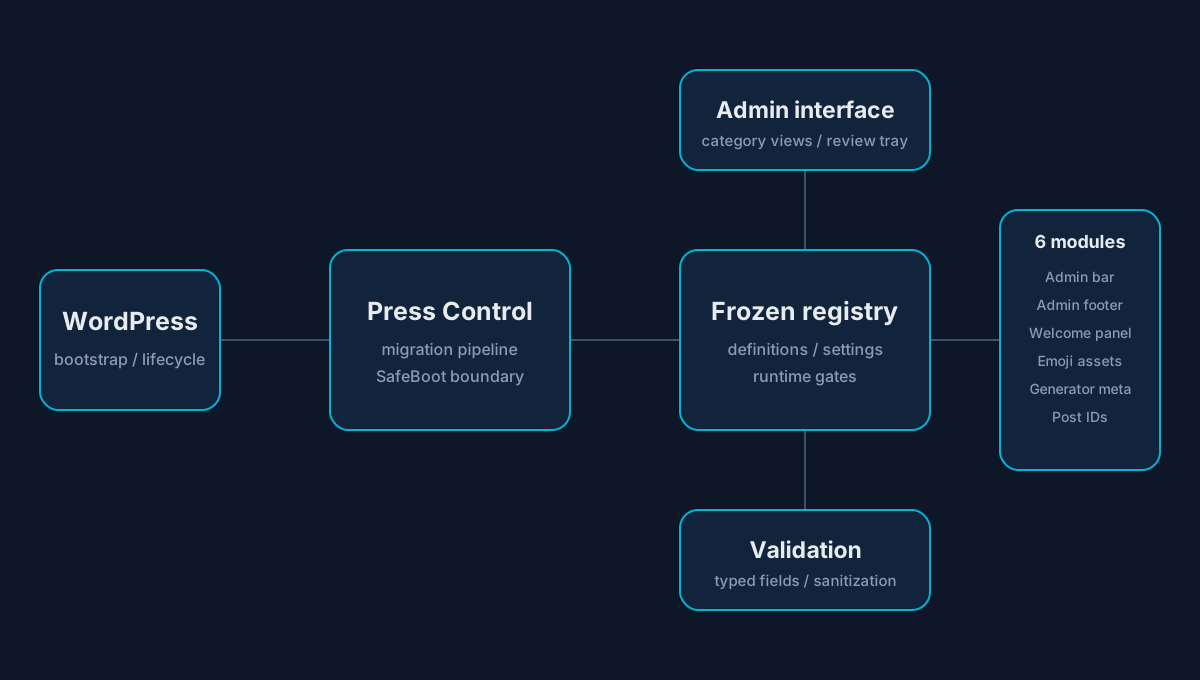
Typed select and integer fields belong to their module definitions. Unknown keys are discarded, invalid choices return to safe defaults, and numeric input is constrained to registered bounds.
Current Alpha 5 modules
The default branch contains six low-risk, opt-in, reversible modules, all disabled by default:
- Admin Bar Cleanup removes the default WordPress logo from the admin toolbar.
- Admin Footer Cleanup removes the default admin footer credit and version text.
- Dashboard Welcome Cleanup removes the default dashboard welcome panel.
- Disable Emoji Assets stops WordPress’s legacy emoji scripts and styles.
- Hide Generator Metadata removes public generator version metadata from pages and feeds.
- Post ID Display adds a configurable, sortable post ID column to supported content list tables.
Administrative experience
The category-first interface uses dedicated WordPress, Bricks, performance, security, content, administration, tools, and settings destinations as navigation categories—not as claims that every category already contains broad functionality. A searchable module library, focused category forms, a staged review tray, and one global setup flow support deliberate changes while preserving settings outside the current view.
Lifecycle, migration, and SafeBoot behavior
Activation and runtime upgrades share a checkpointed migration pipeline. It prevents concurrent migrations, recovers stale locks, rejects automatic downgrades, and rolls back the current failed attempt. When an upgrade fails, SafeBoot pauses module and admin initialization and retains non-sensitive recovery state for diagnosis.
Testing and release discipline
The repository checks WordPress coding standards, static analysis, PHPUnit behavior, identifier ownership, Composer metadata, dependency health, migration behavior, administrative rendering, and release state. Human confirmation remains part of the publishing boundary.
Current boundaries
Press Control is not presented as a Bricks dependency or as a shipped Bricks enhancement suite. It does not claim backup, recovery, broad security, broad performance, or a public source repository. Alpha 6 presets and clean-uninstall work remain outside this shipped-capability account.
Lessons
A modular system becomes safer when a feature’s definition, settings, interface, migration behavior, and runtime gate share the same source of truth. Establishing that boundary early makes later growth easier to review without turning plans into public claims.